Machines, agents and collection
The agent lifecycle: installing the agent on machines, managing those machines and their agents, and driving the collection — templates, tasks, transformer templates and installation packages. This is the Collection side of the product, reached from the Data Collection tile on Home or Configure → Data Collection. Its navigation holds Collection Tasks, the listener and rule lists, and an Agents menu: Agents, Agent Tags, Install Packages, Collection Templates and Parse Templates.
The agent, briefly
Section titled “The agent, briefly”The agent is the machine-side collector. It runs on Linux and Windows hosts, in containers (Docker, Kubernetes), and in local data centers, and it reports back to the platform so one UI can start, stop, upgrade and uninstall agents across the fleet. It is also the delivery vehicle for everything else in this handbook: readers, transformers and senders are configured in the agent’s collection tasks, and the agent’s own event server and OTLP endpoint receive events and traces.
An agent’s runtime state is one of: Online, Sleep, Offline, Exception. Sleep is a deliberate stop; offline is an unreachable agent; exception is a reachable agent whose collector keeps failing to start, so it ships nothing. The info icon beside an Exception gives the collector’s own error — an exhausted inotify limit, for example, names the setting to raise (see Sizing).
The profiler and the network monitor (eBPF) are separate processes, and one
that cannot run does not stop collection, so it does not make the agent
Exception. It stays Online with an amber warning beside the state; the
warning’s tooltip names the component and its own error — for example that
the eBPF monitor needs CAP_BPF, CAP_PERFMON and CAP_SYS_RESOURCE, or that
the profiler cannot run as a non-root user.
The agent’s own page shows each component’s state, restart count, when it entered that state and its last exit. Open it from the drawer the agent’s name opens (Open agent page) or from the row’s menu; its address can be shared. An agent installed before this release does not report its components, and its page says so until the agent is upgraded.
Installing agents
Section titled “Installing agents”Data Collection → Agents ▸ Agents → Add Agent offers two paths:
-
Manual Install — the platform generates an install command for the machine; you run it there. Choose or create a tag for the machine, fill the NIC name (optional; the agent auto-detects), the installation path (default
/usr/local/sondard/agentfor root,~/sondard/agentfor non-root), whether to start on boot, and the OS / arch / agent version. The install command must run as root, and the machine needsbash,curlorwget,tar, andps/pkill.On an OS version that is not on the agent’s tested list the installer asks before continuing. Run from a script with no terminal (cloud-init, CI,
docker run) it stops with an error instead; add--forceto the end of the command to install anyway.At idle with the default configuration, measured on 26 Sep 2026, an agent used about 0.02 of a CPU core and 120–200 MiB of memory. Collection tasks you add raise both.
-
Auto Install — the platform installs over SSH. The target must have SSH enabled and be reachable from the platform; provide IPs (comma-separated, up to a batch), SSH port, login type (password or key file), username, and the same tag/path/version choices. A Test Connect step verifies the reachability before install; the batch then installs and reports per-IP status.
Beyond host installs, the platform generates deploy instructions for Docker (image tag, tags, token), Kubernetes (Helm or manual deploy — cluster, namespace, image tag), OpenShift (privilege grant then the Kubernetes flow), and AIX. A Universal package is a Java agent for hosts the standard agent cannot run on — Linux with a kernel older than 2.6.32, and AIX. It needs Java 8 or later on the host, and its installer stops before changing anything if there is none. The same install surface handles Syslog collection: a lightweight script that runs where an agent cannot be deployed and forwards logs via syslog or UDP.
Windows installs use a downloaded script executed in an administrator CMD (2008 and below must be downloaded manually first); versions 2008+ are supported.
The agent version matters for APM: the locale is explicit that if trace monitoring is disabled the package contains no APM files, and enabling trace later requires reinstalling the agent.
Managing machines and agents
Section titled “Managing machines and agents”The agent list (Agents ▸ Agents) shows agent name, address (IP), status, version, system type, tag, collection-task count, update time, region, service namespace and trace-enabled flag, searchable by name or IP. IP search looks up a pasted list of IPs (up to 1000) against the fleet and shows matches and unmatched.
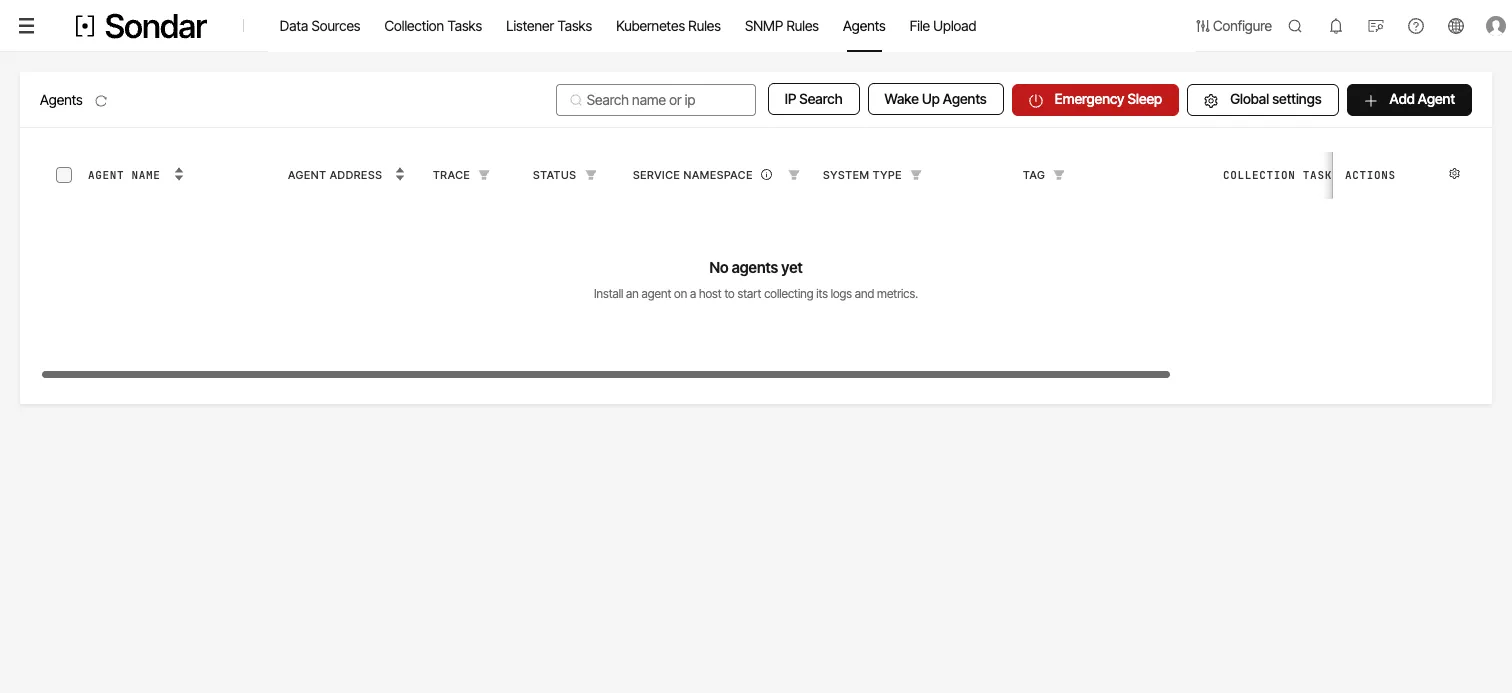
Machine management on a new install. Each row is an installed agent and its reported status; until the first agent is installed the list says so, and Add Agent generates the install command. The table scrolls sideways to version, region and update time. Captured September 28, 2026.
Row and batch operations:
| operation | what it does |
|---|---|
| Configuration | the agent’s own settings — see below |
| Net Setting | change the NIC; the agent restarts to apply |
| Diagnose | Run a diagnostic job against the agent — see below |
| Monitor | collection flow statistics for the machine |
| Upgrade / Wake / Sleep / Uninstall | the lifecycle actions |
| Add Tag / Edit Tag / Edit Service Namespace | group the machine |
Upgrade starts an agent update task for the machines you picked; every update task and its progress is listed under Data Collection → Agents ▸ Update Tasks.
Diagnose runs one of two jobs, and which one you want depends on the symptom:
- Runtime snapshot — for an agent that is unhealthy in itself: out of memory, stalled, not reporting.
- Collection task — for an agent that is running but a specific task is not delivering: lost logs, interrupted collection.
Either takes 20–40 seconds. The result is not shown inline — download it from Configure → Job → Agent Job Records.
Emergency Sleep sleeps all agents at once and is gated behind a high-risk confirmation; Wake Up wakes them in configurable batches and intervals.
Agent configuration
Section titled “Agent configuration”Each agent has a Global Configuration and a Custom Configuration (per machine). The panels:
- Resources Limit — CPU percent/number, memory, disk limits for the agent process; on systemd Linux the CPU limit is the total across the agent’s processes (decimal supported), elsewhere it applies per process. Auto start restarts a blown agent after 30s, and after three consecutive triggers backs off to 20 minutes.
- Agent Log — log path, level, and whether the agent’s own logs/metrics
are collected (
_collector_logand_runner_statusindexes by default). - Base Monitoring Collection — the host metrics/metadata and k8s cluster/node toggles (the infrastructure_monitoring surface).
- Event Collect — the event server port.
- Trace Data Collection — trace on/off, the HTTP (4318) and gRPC (14317) receive addresses, sampling rate, log-correlation mode (OpenTelemetry / native — see the ports table for why the gRPC receiver is 14317 and not 4317), instrumentation and profiling toggles. Profiling is off by default; on Linux it starts the agent’s eBPF profiler — see Profiling in apm.md.
- eBPF Agent Configuration — on Linux, starts the agent’s network-flow
collector: TCP/UDP connections per process (
netflow: bytes, round-trip time, retransmits, the peer and its resolved domain) and DNS lookups (dnsflow), stored ininfrastructure_monitoring_metrics. Off by default; it has the same root and host-PID requirements as profiling (see apm.md). - Offline Agent Retention — automatically delete agents that have been offline beyond a threshold.
Collection templates and tasks
Section titled “Collection templates and tasks”The engine of the collection surface — both are managed lists with the same operations (create, edit, delete, authorize, reassign owner) and both feed the agent configs this handbook documents elsewhere.
Collection templates (Collection Template)
Section titled “Collection templates (Collection Template)”A reusable readers→transformers→senders config plus its name, display name, description, owning app, classification (database, middleware, metric, log, …), group and icon. Creating one starts from a default YAML you customize. A template is what an app ships and what you clone for a new collection.
Transformer templates (Transformer Template)
Section titled “Transformer templates (Transformer Template)”The parsing half, kept separately so it can be reused: name, description, app, group, the parsing method, sample data and parsed results. Used in the “Parse and Transform Data” step of collection-task creation (the official template library), and a task’s parsing can be saved back as a template. Copy, edit, delete, export, authorize, reassign owner.
Collection tasks (Collection Task)
Section titled “Collection tasks (Collection Task)”The concrete, machine-assigned instance. List fields: name, description, target index (repo) and source type when sent to the platform, status (enabled/disabled), the distributed machines, group, update time, owner.
Operations: create (the interactive reader→transform→sender wizard), import, edit (name immutable), distribute (assign to a machine tag — every machine under the tag runs the task), search (jump to Search for the data it collects), monitor (flow statistics: read/send rates, transform success), reset, delete, disable/enable.
Installation packages (Install Package)
Section titled “Installation packages (Install Package)”The platform manages the agent binaries. Default packages for each system
type/arch ship with first install; you can upload more (.gz/.zip, with a
description), download, edit, and delete. Global Setting → Automatic
Cleanup keeps only the latest N packages per OS+arch, with a whitelist of
packages that are never auto-cleaned.
The agent’s own config file
Section titled “The agent’s own config file”The agent loads sondar-agent.yaml (default; -c overrides) with four top
blocks. The file is sondar-agent.yaml (the pre-rename filename
keta-agent.yaml appears in older documentation).
agent: pid_file: sondar-agent.pid token: "" meta_dir: meta rest_dir: .sondarconfs time_layouts: [] event_server: enabled: false port: 10007server: url: ""runtime: max_procs: 1 max_memory: 0 pprof: ""log: level: info file: sondar-agent.log max_size: 100 max_age: 30 max_backups: 5agent—pid_file,token(the server sets this),meta_dir(where the agent stores its own metadata — checkpoints live under it),rest_dir(the collection config directory, default.sondarconfs),time_layouts(custom time formats for transformer parsing),discoveryandevent_server. The old sample’spandora/urlblock is gone; the server address lives underserver.url.runtime—max_procs,max_memory(Go memory limit),pprof(listen address; empty = off).log—level(debug…fatal),file,max_size(MB),max_age(days),max_backups.