Building on the platform — apps and SDKs
Extending Sondar beyond the shipped integrations: building apps that run inside the platform, writing custom visualizations and custom pages, and extending the engine itself with custom SonQL operators, custom APIs and custom storage through the Python SDK.
What an app is
Section titled “What an app is”An app is a self-contained unit that runs on the platform and delivers a data-analysis or presentation capability to its users out of the box. An app can contain:
- Views — pages that render in the platform (the app’s UI).
- Dashboards — prebuilt dashboard definitions, installed with the app.
- Knowledge objects — sourcetypes, field-extraction rules, datasets, lookup tables, collection templates, alert prototypes.
- Collection configs — the collect types, repos and static YAML the app ships (the integration apps in this handbook are all apps).
- Custom pages or components — bespoke front-end built against the app SDK.
- Custom visualizations — new chart types for the chart library.
- Custom operators — new SonQL commands.
- Custom APIs — REST endpoints served by the app.
An app is declared by an app.json at its root (name, title, version,
categories, contents, icon, resources), and its knowledge objects live under
resources/ (dashboards, repos, collect types, metrics, alert prototypes,
i18n). Every integration app in this handbook follows this shape — the
structure is the contract.
How an app upgrade reaches a running install
Section titled “How an app upgrade reaches a running install”An app carries two different kinds of thing, and they upgrade differently.
Code — static assets, the bundled front end, custom visualizations and operators, and the app’s own metadata (title, description, version). This is the product’s to define, so for the apps that ship built in it upgrades with the product: install a new release and the code is applied on start-up, with no prompt and no administrator action. Nothing you have edited is touched.
If you are building images yourself, the trigger is the commit, not the build. The initializer compares the git sha recorded in the image against the one the instance has already seen, and skips the whole upgrade block when they match — so two images built from the same commit are indistinguishable to it, and the second one serves the previous copy of your app however much you changed in between. Commit before you build an image you intend to test against. The tell is in the boot log: an upgrade prints the full
[Init Master]sequence, while a skip goes straight frominit scheduler clean handle jobtocheck commit id and init.
Knowledge objects — dashboards, saved searches, extraction rules, alert prototypes, kvStore. These are yours the moment you edit them, so an upgrade never overwrites them silently. Updating an app’s knowledge objects is an explicit action on Manage Apps, and it asks which side wins: keep your edits, or take the app’s versions.
Two consequences worth knowing:
- Administration survives an upgrade. If you disabled an app, hid it, changed its owner or its visibility scope, those stay as you set them.
- Bump
versioninapp.jsonwhenever you change an app. The version is what an operator reads on Manage Apps to tell one build from another; leaving it unchanged tells them an install matches the shipped app when it does not. For apps in this repository a build check enforces the pairing.
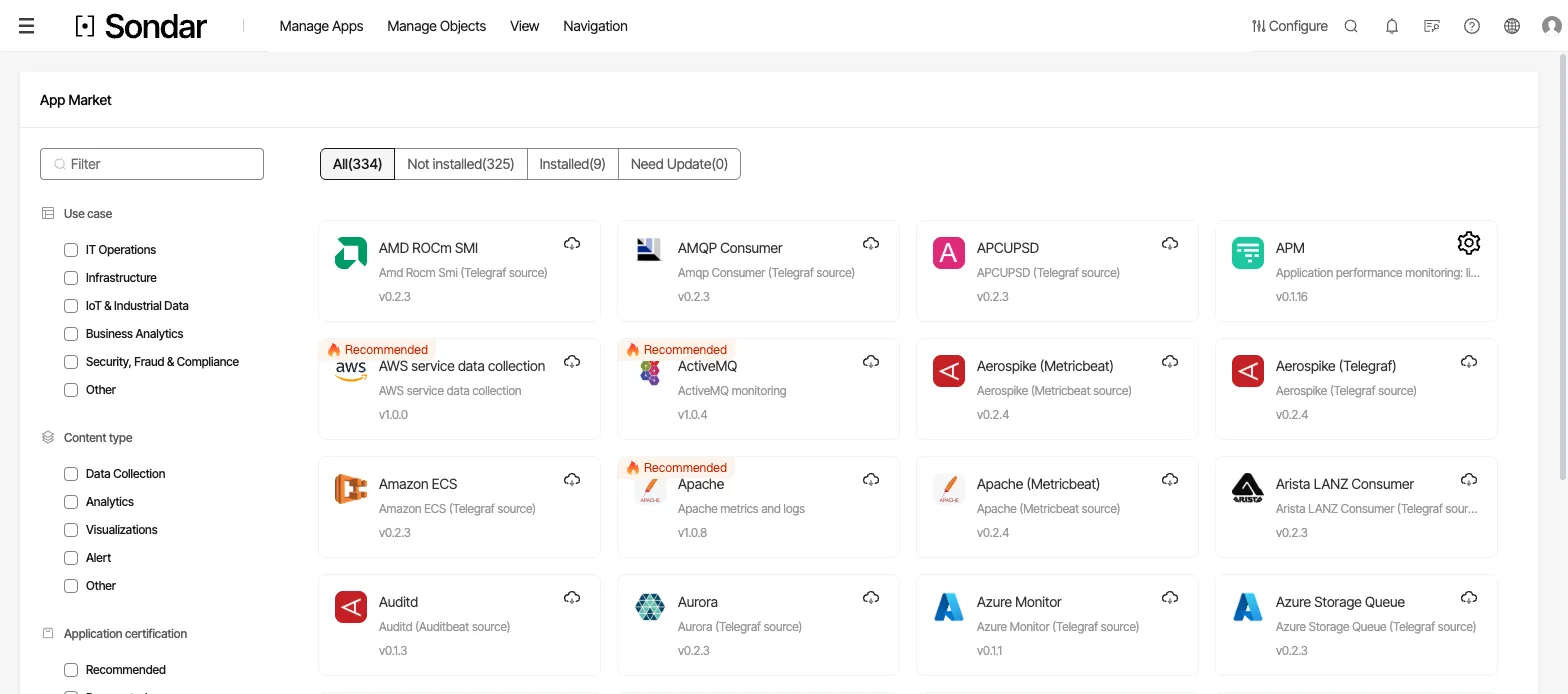
The app catalog. Filters narrow by use case and by content type — what the app provides, such as data collection or dashboards. Captured September 27, 2026.
App categories
Section titled “App categories”Apps come in five kinds, which the scaffolding tool exposes as template types:
| create-sondar-app template | what you get |
|---|---|
simple | an empty app skeleton with the basic config and resources |
visualization | a custom chart type, packaged as a UMD module for the chart library |
view-html | a custom page whose entry is an HTML file (any front-end framework; runs in an iframe, so code-split freely but mind iframe limitations) |
view-component | a custom page extending @sondar/app-sdk.BaseComponent, bundled as a UMD module |
view-component-react | a React single-page app extending the SDK, with access to the shared component libraries (@sondar/component, @sondar/app-component) |
These five cover the app kinds: generalized apps are simple +
dashboards/search, front-end display is view-*, visualization apps are
visualization, and custom operators/APIs are Python SDK work (below).
Scaffolding an app
Section titled “Scaffolding an app”npx create-sondar-app <appName> --template <template>The generated app has the framework and resource directories; add your dashboards, collect types and views, then package it for the app market.
The front-end SDK — @sondar/app-sdk
Section titled “The front-end SDK — @sondar/app-sdk”@sondar/app-sdk provides the platform’s core capabilities to an app’s
front-end. The central piece is the Manager family, which wraps the
platform APIs:
SearchManager— runs a search and streams its result events (done, per-event data, summary, timeline, result), taking a search condition (queryString+time) and task options.- The rest of the SDK (routing, permissions, the
BaseComponentbase class, event naming) lets an app behave as a first-class platform citizen — the same surface the platform’s own views are built on.
The SDK also ships the SonQL grammar the query editor and the engine share (the grammar is generated from the backend’s ANTLR files), so an app’s query editor never disagrees with the engine.
The Python SDK — pdr-python-sdk
Section titled “The Python SDK — pdr-python-sdk”The server-side SDK for extending the engine itself. Installed from pip
(pdr-python-sdk, Python 3), it provides three extension surfaces:
- Custom operators — new SonQL commands. The
splmodule provides the base classes: a command receives the streaming row packet and emits rows back (spl_base_command, streaming batch and streaming chunk variants). Ademo/spl/chunk_foobar.pyis a worked example. - Custom APIs — new REST endpoints, implemented against the
apimodule (on_demand_api, packet/response helpers).demo/api/hello_world.pyis a worked example. - Custom storage — new data-storage backends via the
storagemodule.demo/storage/storage.pyis a worked example.
The SDK talks to the platform over its client (client.py, manager.py,
entity.py), and the demos under demo/ are the fastest way to start.
Managing apps
Section titled “Managing apps”The platform’s app management surface (the App/AppStore modules) handles the full app lifecycle: create, edit, enable/disable, view the objects inside an app, authorize access, and delete. The app market is where the shipped apps (this handbook’s integrations) are installed from and where a custom app is published to.
Accessing the API
Section titled “Accessing the API”Every platform capability is reachable over REST:
- Request path —
http://<host>:<port>/api/v1/...(the platform’s HTTP port). - Authentication — two schemes, and they are not interchangeable. The JSON
API is session-based: log in, then send the
X-Csrf-Tokenthe login returned together with the session cookie. A collect token (generated under Configure → Access Control → Collection Tokens) authenticates data going in — agent uploads, OTLP, HEC — and does not authorize the JSON API. See the API reference for both, and the two failures they produce. - Reference — each surface’s API is documented by its controller; the interactive search and job APIs are the ones an automation script most often drives.