Alerts and notifications
How Sondar evaluates alert rules, and how it tells someone.
The shape of an alert
Section titled “The shape of an alert”An alert is a query, a schedule, a condition on the result, and one or more notifications.
condition: search2 repo="app_logs" ERROR | stats count() as error_count error_count > 100schedule: every 5 minutesnotify: email → the on-call groupThe query runs on its schedule; the condition is applied to its result; when the
state changes the alert fires and an event lands in _alert_event.
Name the engine in the query. A condition that begins with neither
searchnorsearch2is evaluated by whichever engine the global Default Search Engine setting names, and the two engines do not agree on every command — the current example is thetransactionadded-field naming (_event_count/_durationon search2,eventcount/duration_secondon search1; both engines run a partitioned transaction since 15 Aug 2026);chartandmvexpandagree since 14 Aug 2026;mvcombineagrees only once you reduce the fields — an alert condition using the bare form returns no rows on search2 against a multi-sourcetype repo (measured 12 Sep 2026), so add| fieldsor namesearch. An administrator changing that dropdown can therefore change what your alerts do. Of the seven alert conditions that ship with the product, one is a bare query; the rest are pinned or use command families the setting does not affect.
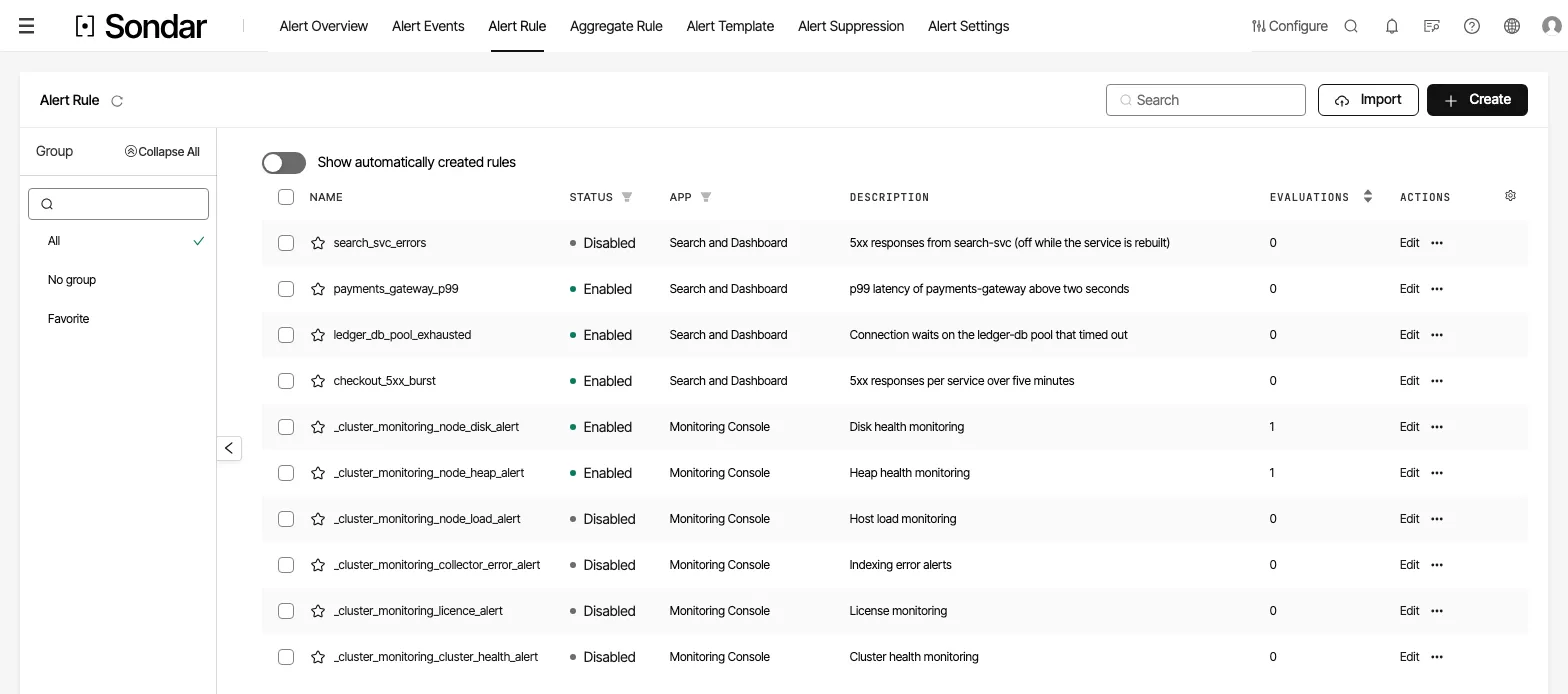
The alert rule list. Status is per rule, so a rule can be switched off without deleting it. Captured September 30, 2026.
Rule types
Section titled “Rule types”The Select Alert Type picker offers eight, matching the AlertSceneType
enum the server accepts. Four are witnessed working.
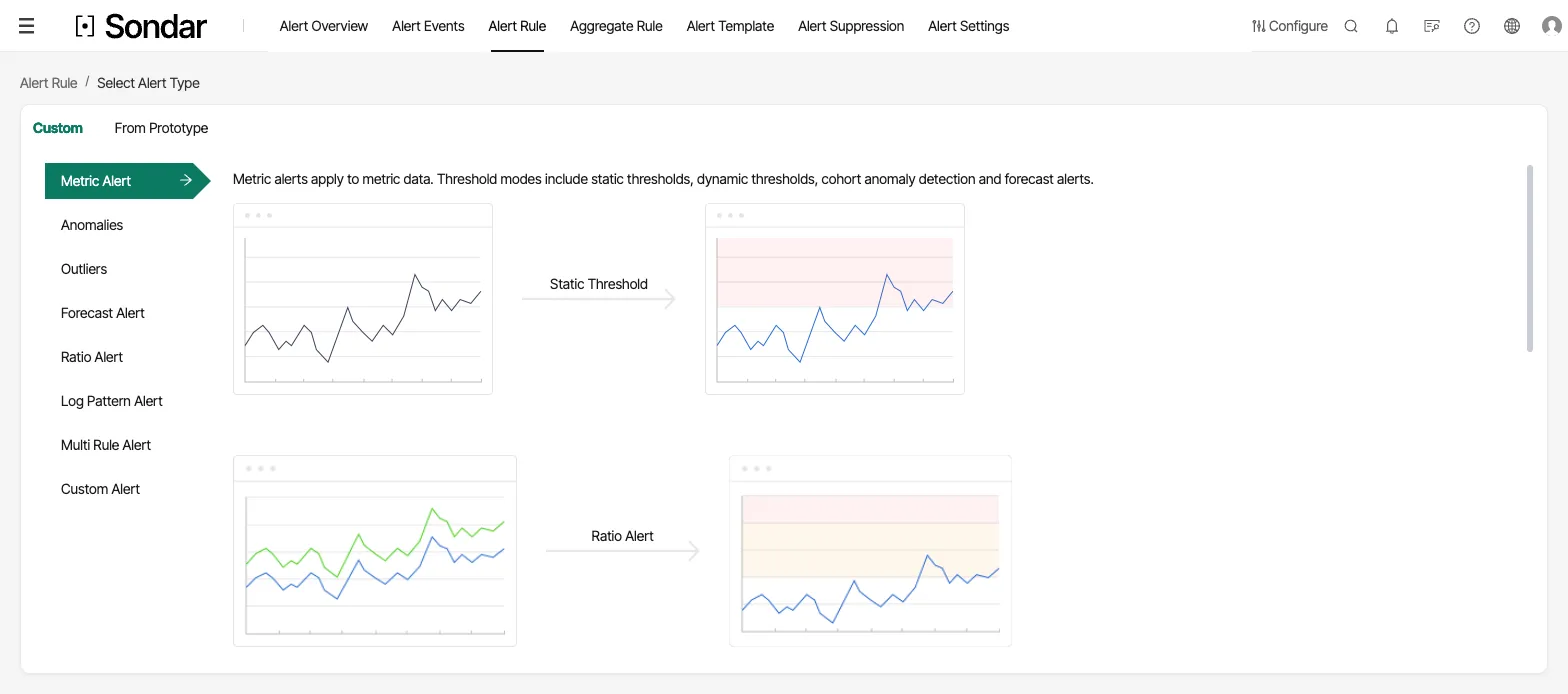
Choosing an alert type. The eight types are listed on the left, and the panel beside them explains the selected one. Captured September 27, 2026.
| type | wire value | state |
|---|---|---|
| Metric Alert (static threshold) | static | works — the common case, and what the example above is |
| Ratio Alert (month-on-year comparison) | ratio | works |
| Log pattern alert | pattern | works, and does not depend on the ML runtime |
| Custom | custom | works |
| Multi Rule Alert | multiple | form ships and the server accepts it; not witnessed firing — see below |
| Anomalies | anomalies | re-implemented; see below |
| Forecast Alert (predictive) | forecast | re-implemented; see below |
| Outliers | outliers | re-implemented; see below |
Multi Rule Alert is the compound type: it fires from a combination of other alert rules rather than from a query of its own. It does not nest — when you pick its sub-rules, other Multi Rule Alerts are filtered out of the list, so a compound rule is always exactly one level deep. It is listed here because it was missing from this table entirely; like the three re-implemented types, it has not been observed firing from a shipped image, so treat it the same way.
What changed, and what is still owed. These three used to be unbuildable:
they rested on the SonQL commands anomalies, forecast and outliers, which
reached a Python service that was never assembled into the image, so a rule
could be created and could never fire. That tier has been removed, and the
three capabilities re-implemented to run inside the engine itself — seasonal
decomposition, an extreme-value threshold rather than a fixed multiple of the
standard deviation, changepoint detection separate from spike detection, and a
persistence rule.
The commands run end to end through the query path, and rules built in the UI of a shipped image have been opened, saved and observed firing.
How well they detect, measured against real data (2 Sep 2026). These are now run against BOOM — 605 real observability series from Datadog’s own pre-production monitoring — with known excursions planted into them. The harness is committed and re-runnable, and the protocol is ours over their data, so it is not comparable to a published leaderboard number.
The calibration result is the one worth acting on: at the default sensitivity the detector raised zero alerts across 60,000 points of clean data with no anomalies in it. It is not a detector that fires constantly and leaves you to filter — the default is genuinely quiet.
On real series with a planted excursion, spikes that land clearly outside the learned band are found reliably; sustained level shifts less so, and how much less depends on how large the shift is relative to the band. Seasonal shape is close to not working at all, which is why it is labeled experimental in the product and off unless you choose it.
Two things follow for you. Real data is eventful — about 4.6% of points on untouched real series fall outside the band, and some of those are genuine, so expect to tune sensitivity to your own metrics rather than to a number here. And an alert that never fires is not evidence of health: if a rule has been silent for a month, plant a change you know about and check it fires.
Notifications
Section titled “Notifications”A notice is a named, reusable configuration — a channel plus its credentials —
stored under Alerts → Alert Settings → Trigger Action (/alert/notice/way). A rule
references notices by id. Notices are scoped per app and can be created for
either alert category (event or incident).
Changed 13 Aug 2026 — the picker now offers the named channels US
evaluations expect. Measured against the shipping code, not the 5 Aug
version of this page. The per-user types are still Email, WeChat and
DingTalk (the latter two are Chinese messaging platforms, delivered as
User or Robot notices), but beside them the picker now lists, each with
its own setup form and server-side method:
| channel | wire value | notes |
|---|---|---|
| Slack | slack | incoming-webhook URL |
| PagerDuty | pagerDuty | Events API v2; dedup_key correlation (#102) |
| Microsoft Teams | teams | Workflows Adaptive Card |
| Opsgenie | opsgenie | alias correlation |
| ServiceNow | serviceNow | correlation_id; configurable resolvedState |
| Jira | jira | v3 ADF; recovery comments rather than transitioning |
| Discord | discord | answers 204 No Content |
| Google Chat | googleChat | webhook URL |
| Mattermost | mattermost | webhook URL |
| Amazon SNS | sns | SigV4; correlationKey |
| Kafka | kafka | inherited |
| Webhook / Script / Custom | — | generic destinations; payload is the customer’s to template |
The named channels were shipped 11 Aug 2026: Slack and PagerDuty landed with #102 on 9 Aug but were a listing without a form — selectable, required server-side, with nowhere to type the URL. The missing form and the rest of the set followed. Each shipped channel is configurable in the UI, has a platform-shaped payload, the platform’s real success contract checked, and a recovery that closes rather than re-opens. Jira is the deliberate exception: it comments instead of transitioning because transition ids are per-project and not portable.
Credentials are write-only (#139). A notice’s secrets read back as a sentinel; an unchanged edit preserves the stored value, and an absent value deletes. Only the notice’s LIST permission is needed to read them, so this is what stops a read permission becoming credential disclosure.
Changed 13 Aug 2026. Two channels that used to ship, CiticWebHook and WasuWebHook — integrations with CITIC Bank’s and Wasu Media’s internal webhook platforms — were removed 6 Aug 2026 and are no longer offered to any customer. The
DeployEnv.Citic/DeployEnv.Wasudeployment flags that gated an SMS channel are gone with them; the deploy enum is now onlypublicandprivate. This page said “specified and scoped but not yet built (#102)” for Slack/PagerDuty through 11 Aug; that row was already wrong when written and is corrected here.
Delivered end to end: the generic webhook. On a September 2026 build, a rule fired on its next run after its data arrived, and a plain HTTP receiver got the whole notice as JSON — the alert’s name and level, its query and time range, and the values that triggered it.
Still unverified: the vendor channels. Every Slack, PagerDuty, Teams and other vendor payload matches that vendor’s published contract and is pinned by tests (47, including the published AWS SigV4 key-derivation vector); none has yet been accepted by a live vendor endpoint. Closing that needs a live account per channel.
Links in notifications
Section titled “Links in notifications”A notification carries the address Sondar knows itself by, for the links back
into the product. In a container or behind a load balancer that is an internal
address a recipient cannot open — measured: http://172.17.0.2:9200 from a
server in Docker. Set the address people actually use:
docker run -d --name sondar -p 9200:9200 \ -e sondar.alert.host=https://sondar.example.com \ -v sondar-data:/usr/share/sondar/var sondar:latestWith that set, the same webhook carried https://sondar.example.com. (A
region’s server URL, where one is configured, takes precedence over this
setting.)
TLS for alert delivery
Section titled “TLS for alert delivery”Every channel that delivers over HTTPS — the webhook, Slack, PagerDuty, Teams and
the rest — checks the receiver’s certificate against the server’s Java trust
store, and checks that the certificate names the host in the URL. So does email,
for SSL and TLS (STARTTLS); with TLS chosen, a mail server that does not offer
STARTTLS is refused, so mail is never sent in plain text by surprise. The same
rules cover the http and es exports and dashboard
subscription email.
A receiver with a self-signed or private-CA certificate fails that check. The
right fix is to trust its CA: import the certificate into the Java trust store the
server runs with, or point javax.net.ssl.trustStore at one in jvm.options.
If you cannot, one switch turns the checks off for every receiver on the node:
docker run -d --name sondar -p 9200:9200 \ -e sondar.delivery.tls.insecure_skip_verify=true \ -v sondar-data:/usr/share/sondar/var sondar:latestTreat it as a last resort. With it on, anyone on the network path to a receiver can read alert content and capture webhook URLs — and a Slack webhook URL is itself the credential. The server logs a warning the first time it delivers with the checks off. It does not make STARTTLS optional: a mail server set to TLS must still offer it.
Changed October 2026. Before then, mail with SSL or TLS accepted any CA-issued certificate, whatever host it named, and TLS fell back to plain text when a server did not offer STARTTLS.
Escalations
Section titled “Escalations”An escalation notifies someone else when an alert is still unhandled after a delay. Build them under Alert Settings → Escalation, then attach one to a rule in the rule’s Escalation field — in the rule editor, or in the notices dialog on the rules list.
Each escalation has:
- Trigger — what “unhandled” means: Not closed or recovered, or Not confirmed. Confirm is the action on Alert Events.
- Steps — each one reads After N minute(s), if the alert is still …, escalate to: and names a notification method (for example Send to System User), who to notify, and a channel (for example an email template). The delay takes 1 to 1000 minutes. Add more with Add escalation step.
- Repeat — optionally run the whole escalation again, up to 3 times, if no one confirms.
A new escalation is enabled; the list shows its status.
Who may change one. An escalation belongs to whoever created it. Opening, editing, disabling and deleting each need permission on that escalation — its owner’s, or a share granted on it — not only on escalations in general. Editing an escalation keeps its owner; to hand it over, use Reassign Owner.
Verified on 26 Sep 2026 on a development build: a two-step escalation was created, reopened with both steps intact, saved unchanged and reopened again identical. Not verified here: an escalation actually firing, which needs an alert left unconfirmed past the delay.
Aggregation
Section titled “Aggregation”Aggregation rules group related alert events so that one incident does not produce fifty notifications. Rules are created, managed, enabled and disabled independently of the alerts they group, and the configuration can be exported.
This is the mechanism to reach for before turning an alert’s threshold up to quiet it: raising a threshold loses signal, grouping does not.
What was verified, and what was not
Section titled “What was verified, and what was not”Verified running: creating an alert; forcing a real threshold crossing
(normal → abnormal, with events landing in _alert_event); delivering it to a
live webhook receiver (September 2026); listing and
inspecting the stored condition of all seven shipped alerts; the engine exposure
of each. The note that anomalies/forecast/outliers were rejected on both
engines was true when written and is now superseded — see Rule types.
Verified in code, 13 Aug 2026: the notification picker’s channel list is
server-driven (GET .../notice/types) and now names Slack, PagerDuty, Teams,
Opsgenie, Discord, Google Chat, Mattermost, ServiceNow, Jira, Amazon SNS, Kafka,
Webhook, Script and Custom; each named channel has a backend NoticeMethod and
a UI form branch.
Test each channel before you rely on it. That an alert fires is independent of whether its message arrives: delivery depends on the credentials you supply for the target service. Send a test notification on every channel you configure.
Event review
Section titled “Event review”An alert firing produces events in _alert_event. Alerts → Alert Events
(/alert/events) is where they are worked.
Two views, switchable with a toggle at the top of the page:
- Raw (
/alert/events/raw) — one row per event. - Aggregate (
/alert/events/aggregate, the default) — one row per group of related events, with a merge count column; the aggregate row expands into a drawer showing the events in the group. Alerts → Alert Overview offers the same two views read-only as raw/aggregate tabs.
An event has a status, and the status gates what can be done to it:
| status | meaning | open to |
|---|---|---|
created | fired, not yet touched | Confirm / Assign |
assigned | someone owns it | Confirm / Assign / Process / Close |
processing | being handled | Close |
resolved | recovered (or recovery confirmation recorded) | — (closed) |
closed | done | — (closed) |
The list filter/search covers event id and name, target, app, level, status,
service namespace and suppression state, and the assignee view can be switched
between All and Own — the “own” view plus the created/assigned
status filter is the on-call inbox. Column visibility is per-user through the
gear.
Row operations and batch operations (same set, both available from the table):
- Confirm — acknowledge the event without assigning it.
- Assign — hand it to a user; the modal offers the same delivery methods as notices (email / WeChat / DingTalk) plus a template, and the assigned user is notified on those channels.
- Process — mark it as being worked.
- Close — finish it.
Selecting the event name opens a detail drawer (or a full page at
/alert/events/raw/detail/:eventId) showing:
- the alert preview — the rule’s condition view with the real value that triggered it, the query that produced it, and the alert range;
- the event detail — the triggering records with per-metric
normal/abnormalstatus; - the timeline —
trigger,notice,suppression,noticeError,assigned,confirm,closed,resolved,suggestionandnotifyUpgradeentries with timestamps; the detail page inlines a recovery (“Resolve manually”) action that writes aresolvedtimeline entry; - the notices that fired, with any per-channel delivery errors, and a link back to each notice’s configuration;
- drill-down querySpl links that open the triggering logs in Search.
Aggregate event groups
Section titled “Aggregate event groups”Alerts → Aggregate Rule (/alert/aggregate_rules) groups related events so
that one incident does not produce fifty notifications — reach for this before
raising an alert’s threshold to quiet it (raising a threshold loses signal,
grouping does not).
An aggregate rule defines:
- Group fields (
groupFields) — the fields whose values identify the subject (host,service, …). A group’ssubjectis rendered asfield=value, …. - A filter condition (
filterCondition) — an AND/OR tree of judge groups (IJudgeGroup= OR of ANDs; each leaf isfield+type+threshold/valuewithgt/gte/lt/lte/eq/neq/match/mismatch/regex) that selects which events join a group. - An interval (value +
h/m) — the aggregation window. - Trigger condition and the notices to fire when a group forms.
The Aggregate event list shows, per group, the merge count, the subject, the
filter condition, the group’s time range and its level. Opening a group’s row
runs the stored drill-down querySpl (start/end/queryString/fragment)
to list the merged events, and the raw events behind a group can be worked
individually.
Per-type walkthroughs
Section titled “Per-type walkthroughs”Rules are created under Alerts → Alert Rule → Create, as a two-step wizard
(/alert/rules/create/step1, step2). The type picker (the sceneType)
determines what the condition form asks for. The picker offers eight types,
all eight of which are listed in the Rule types table above:
-
Log pattern recognition (
pattern) — pick a repo/query and an event pattern; does not depend on the ML runtime. This is the log-relevant type this handbook is mostly about. -
Metric alert (
static) — a metric value compared against a threshold (the common case; the example at the top of this page). -
Multi-rule alert (
multiple) — combines other rules with AND/OR into one event (subRules). Sub-rules cannot themselves be multi-rule alerts, so a compound rule is always one level deep. -
Ratio alert (
ratio) — month-on-year comparison of a metric. -
Outliers / Anomaly / Forecast (
outliers/anomalies/forecast) — re-implemented natively; see the note under Rule types above. The settings are no longer algorithm names. An anomaly rule takes a sensitivity (a rate, not an algorithm — the default is about one false alarm per series per fortnight), a persistence, a seasonal cycle, whether drops count, and what it is looking for. Forecast rules take the threshold whose crossing is the alert; outlier rules take a tolerance in robust-sigma units against the cohort.Persistence and seasonal cycle are durations, not point counts. The form takes “2 minutes” and converts it against the span the rule’s query will use, showing you the result (
= 2 samples). A rule therefore keeps its meaning when the span changes, which it did not when these were stored as bare numbers.“Looking for” selects the kind of anomaly, not a different detector. One engine answers one question and the rule filters to the kind it cares about, so a level shift still informs the model even when the rule only wants spikes:
mode fires on Anything unusual any flagged point (the default) Spikes a single point away from the pattern Level shifts the baseline moving and staying moved Seasonal shape the shape of a cycle changing while its level holds — experimental Seasonal shape is off unless you pick it, and the form says so beside the control: it can miss real changes and flag cycles that have not changed. It also needs about 20 cycles of history — roughly 20 days for a daily cycle — and the form tells you how many the selected range holds.
-
Custom (
custom) — the query author writes the SonQL (data sourcesplor a saveddataset) and the condition by hand; the engine note above applies in full.
Every type shares the same supporting blocks: frequency (a cron or a
cron-date schedule), active period (daily / working day / non-working
day / trading day / non-trading day), the alert range (relative
start/end), levels with per-level judge groups, event name/description
templates (rich text or plain), no-data handling, recovery (by
condition or after a period, optional), suppression (levels, window,
event-threshold and notice-threshold, optionally reset on recovery), and the
notices + optional escalations to fire.
Permission control
Section titled “Permission control”Alert surfaces are gated by role functions:
| function | grants |
|---|---|
alert_event_view | Alerts → Alert Overview (read-only raw/aggregate review) |
alert_event_own | Alerts → Alert Events — the working surface (confirm / assign / process / close), all routes under /alert/events |
alert_rules | Alerts → Alert Rule |
aggregation_rules | Alerts → Aggregate Rule |
alert_shield | Alerts → Alert Suppression (mask notifications for an app or rule for a period) |
alert_prototype | Alerts → Alert Template (rule templates) |
alert_notices | Alerts → Alert Settings → Trigger Action (/way), with per-object operations |
alert_notice_upgrade | escalations |
alert_templates / alert_level / alert_user_group / alert_notice_user | the supporting notice configuration pages |
Row-level actions additionally check the object’s own operations (e.g. only
an owner or an admin can assign a created/assigned event). Route guards live
in modules/Alert/index.tsx; the function ids are in
@sondar/app-sdk/apis/permission/role/model.ts. The full model — functions,
roles, operations and the limits a role can carry — is in
roles-and-permissions.md.