Search jobs and task management
Every time a search runs — from the search bar, a dashboard, a dataset, a report, or an alert condition — the platform records it as a search job. The jobs page is where those executions are inspected and stopped.
The job list
Section titled “The job list”Configure → Job lists your recent search executions. Each job records:
- the SonQL statement (expandable; clicking the statement jumps to Search with that query);
- the search engine used (search1 / search2 — see search-sonql-reference.md);
- status — running, finished, and the stop states (stopping, stopped, stopped-for-timeout, stop failed);
- the start time, the owner, the run duration, and the expiry.
An administrator (or equivalent role) can see and manage everyone’s jobs, not just their own.
There are two job families on the same page: the SonQL job (a search execution) and the scheduled task (background engine tasks such as target-alert synchronization and file-archive deletion, listed in the UI as Scheduled Task Records), each searchable and inspectable independently.
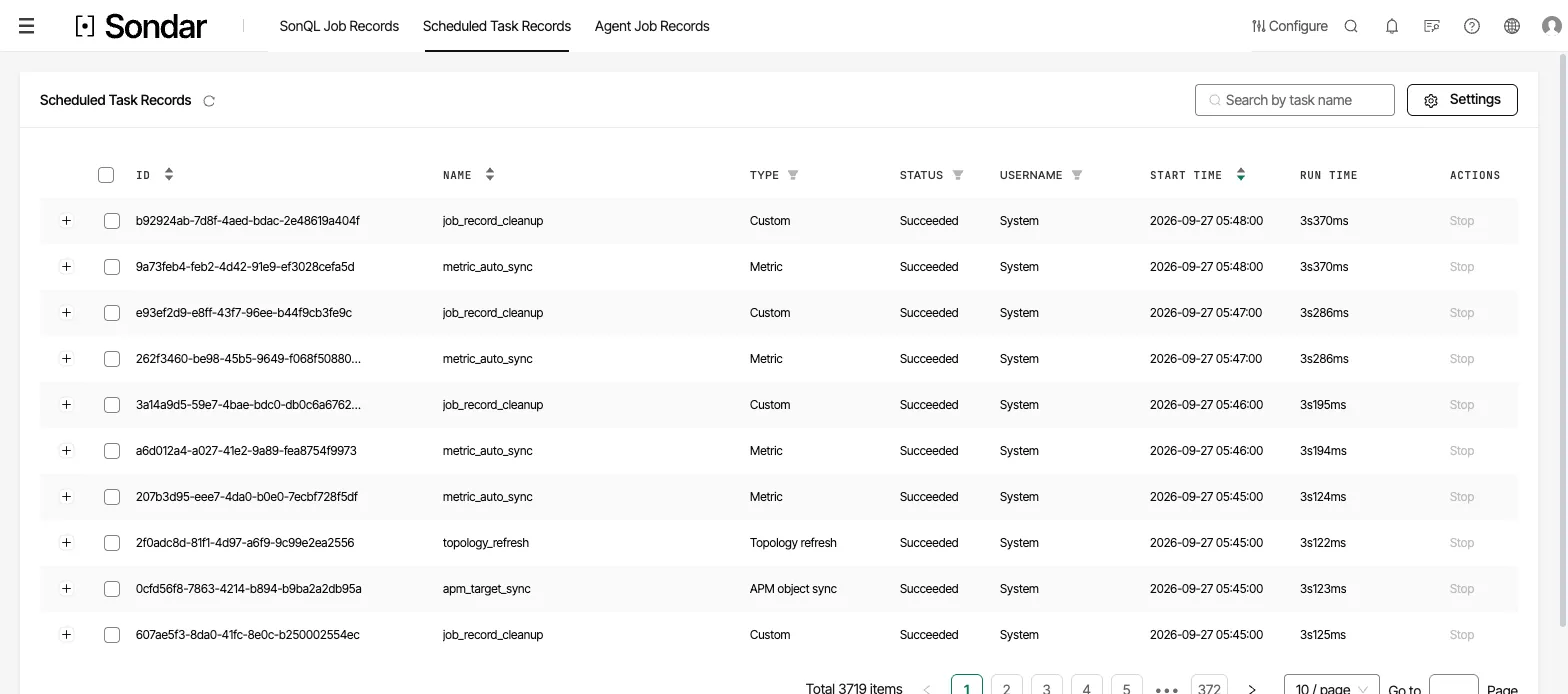
Scheduled task records. Every run of a background task is recorded with its type, outcome, start time and run time. Captured September 27, 2026.
Stopping and deleting
Section titled “Stopping and deleting”- Stop — a long-running search can be stopped to release cluster resources; the job moves through stopping → stopped.
- Delete — remove the job’s record.
The page also exposes a timeout setting per job type, so a job that runs longer than a threshold stops itself automatically.